

HOW-TO GUIDE | GALAXY GAS
How to Use Galaxy Gas Tanks: A Step-by-Step Guide & Common Troubleshooting Tips
New to Galaxy Gas, or running into issues with your setup? This guide covers everything from first use to fixing the most common problems — so you can get back to creating perfect results every time.
Galaxy Gas N2O tanks are designed to be straightforward, reliable, and consistent — but like any precision equipment, getting the best results comes down to knowing how to use them correctly.
Whether you’re setting up for the first time or troubleshooting an issue mid-service, this guide has you covered.
Part 1: How to Use Your Galaxy Gas Tank
Follow these steps carefully to ensure a safe, effective, and consistent experience every time you ask how to use galaxy gas tank.
Step 1: Gather Your Equipment
Before you begin, make sure you have the following on hand:
1. Your Galaxy Gas N2O tank
2. A compatible whipped cream dispenser (iSi, Mosa, or similar)
3. The appropriate nozzle and decorating tips for your intended use
4. Your liquid or cream mixture, chilled if required
Step 2: Prepare Your Dispenser
Pour your cream or liquid mixture into the dispenser bottle. Do not overfill — leave enough headspace for the gas to pressurise the contents effectively.
As a general rule, fill to no more than two-thirds capacity. Securely attach the dispenser head, ensuring the gasket (rubber seal) is properly seated inside. A misaligned gasket is one of the most common causes of leaks and pressure loss.
Step 3: Attach the Galaxy Gas Tank
Screw the Galaxy Gas charger or tank into the charger holder on your dispenser. Turn slowly and steadily — you will hear a hiss as the gas transfers into the dispenser.
This is completely normal. Continue screwing until the hissing stops, which indicates the full charge has been released. Do not force the charger beyond this point.
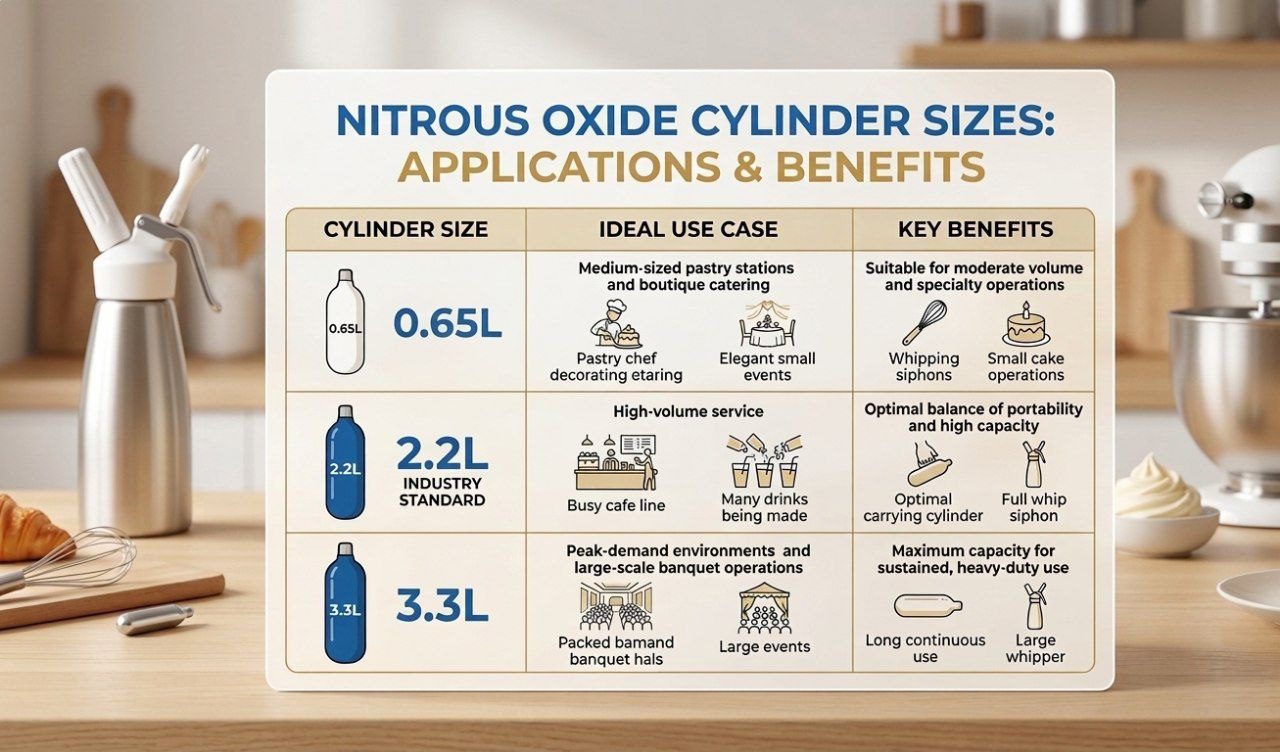
Important: For large-format Galaxy Gas tanks (0.6L-3.3L), attach the regulator valve first before connecting to your commercial dispenser. Always follow the specific instructions included with your tank model.
Step 4: Shake and Dispense
Once charged, give the dispenser a firm shake — typically 2 to 3 times for cream-based mixtures. This helps the gas fully incorporate into the liquid. Hold the dispenser upside down with the nozzle pointing downward and press the lever to dispense. Apply steady, even pressure for best results.
Step 5: Store an extra nozzle
The cream comes out in an uneven, spluttering stream.
Cause: Cream or mixture residue has dried and hardened inside the nozzle tip, blocking the flow of gas and liquid.
Fix:
– Remove the nozzle from the dispenser head.
– Soak the nozzle in warm water for 10 to 15 minutes to loosen any dried residue.
– Use a small cleaning brush or pipe cleaner to gently clear the blockage.
– Rinse thoroughly and reattach before use.
Prevention tip: Always rinse your nozzle immediately after use and store it clean and dry.
Issue 2: Gas Leaking from the Dispenser
Symptoms: You can hear gas escaping from around the dispenser head or nozzle area after charging.
Cause: The most common culprits are a damaged or misaligned gasket, a loose dispenser head, or a cracked nozzle. Dispose Correctly
After use, any remaining contents in a charged dispenser can be stored in the refrigerator for up to 72 hours — keep the head attached to maintain pressure.
Once your Galaxy Gas tank is fully discharged, remove it from the dispenser and dispose of it responsibly. Spent chargers are made from recyclable steel and can be placed in your metal recycling bin.
Part 2: Common Issues & How to Fix Them
Even with the best equipment, problems can occasionally arise. Below are the most frequently reported issues with whipped cream dispensers and Galaxy Gas tanks — along with clear, practical solutions.
Issue 1: Nozzle Blockage or Clogging
Symptoms: Nothing comes out when you press the lever
Fix:
– Depressurise the dispenser safely by pressing the lever until all gas is released.
– Unscrew the head and inspect the gasket. If it is cracked, warped, or misaligned, replace it immediately.
– Ensure the head is tightened securely before recharging — hand-tight is sufficient; do not use tools.
– Inspect the nozzle for cracks and replace if necessary.
Prevention tip: Check and replace gaskets regularly — they are inexpensive and a leading cause of pressure loss.
Issue 3: Cream Comes Out Too Liquid or Flat
Symptoms: The dispensed cream is runny, lacks volume, or deflates almost immediately.
Cause: This is usually a result of warm cream, insufficient fat content, not enough shaking, or using an underfilled charger.
Fix:
– Always use cream with a minimum fat content of 35%. Lower fat content will not whip effectively under N2O.
– Chill both the dispenser and the cream before use — ideally at 4 to 6 degrees Celsius.
– Shake the dispenser more vigorously after charging — 3 to 5 shakes is ideal.
– Ensure you are using a genuine Galaxy Gas charger, as underfilled third-party chargers may not provide sufficient pressure.
Issue 4: Charger Does Not Seem to Release Gas
Symptoms: You have screwed in the charger but hear no hiss, and the dispenser has no pressure.
Cause: The charger may not be seated properly, the charger holder pin may be obstructed, or in rare cases, you may have received a defective charger.
Fix:
– Unscrew the charger and inspect the charger holder. Look for debris, cream residue, or damage to the piercing pin.
– Clean the holder with a dry cloth and attempt with a fresh Galaxy Gas charger.
– If the problem persists, the piercing mechanism may be worn or damaged and the holder may need replacing.
Issue 5: Dispenser Lever is Stiff or Stuck
Symptoms: The dispensing lever is difficult to press or feels stuck in position.
Cause: Dried cream residue inside the lever mechanism or around the valve seat is the most frequent cause of stiffness.
Fix:
– Depressurise the dispenser fully before attempting any cleaning.
– Disassemble the dispenser head according to the manufacturer’s instructions.
– Soak all parts in warm water for 20 minutes, then scrub with a soft brush.
– Rinse, dry thoroughly, and reassemble before testing again.
Tip: Disassemble and clean your dispenser fully at least once a week if used regularly.
Part 3: Maintaining Your Dispenser for Long-Term Performance
Proper maintenance is the single best way to avoid issues with your Galaxy Gas setup. Follow these best practices to keep your equipment performing at its best:
Clean after every use: Rinse the nozzle, head, and bottle immediately after dispensing to prevent cream from drying and clogging internal components.
Inspect gaskets regularly: A worn gasket is the leading cause of leaks and pressure loss. Replace every few months or at the first sign of cracking.
Do not use abrasive cleaners: Harsh chemicals or scrubbing pads can damage the internal surfaces of the dispenser and contaminate future batches.
Store correctly: Keep your dispenser disassembled and dry when not in use. Storing it assembled with residual moisture can lead to mould and component degradation.
Use genuine Galaxy Gas chargers: Third-party Galaxy gas chargers may vary in fill weight and gas purity, leading to inconsistent results and potential damage to your dispenser over time.
Still Having Trouble? We’re Here to Help
If you have followed the steps above and are still experiencing issues with your Galaxy Gas tank or dispenser, our customer support team is ready to assist.
Whether it’s a technical question, a compatibility query, or a product concern, we aim to resolve every issue quickly and professionally.
You can also explore our full range of replacement parts — including nozzles, gaskets, charger holders, and dispenser heads — available directly through the Galaxy Gas website. Keeping spare parts on hand means downtime is never a problem.
| Ultimate Galaxy Gas Buying Guide: What To Know
BEGINNER SECTION
If you’re new or learning how to use Galaxy Gas effectively is a game-changer. Galaxy Gas specializes in high-quality nitrous oxide (N2O) whipped cream chargers and dispensers, allowing chefs and home enthusiasts to create professional-grade foams, mousses, and infused liquids in seconds.
Step-by-Step Guide to Using Galaxy Gas for Whipped Cream
To achieve the perfect consistency, follow these simple steps:
Prep Your Ingredients: Fill your whipped cream dispenser with chilled heavy cream and your choice of sweeteners or flavorings. Do not exceed the maximum fill line.
Seal the Dispenser: Screw the head of the dispenser on tightly to ensure an airtight seal.
Charge the Device: Place a Galaxy Gas tank and its appropriate regulator into the holder and twist it onto the dispenser head. You will hear a distinct hiss as the gas is released.
Shake and Serve: Shake the canister 5–10 times to integrate the N2O with the fats in the cream. Invert the dispenser and press the lever to decorate.
Why Choose Galaxy Gas for Culinary Use?
Using a flavored whipped cream charger from Galaxy Gas adds a unique twist to desserts. The N2O gas acts as a stabilizer, providing a lighter texture than hand-whipping. Always ensure you are using these products for culinary purposes only and follow all safety guidelines
Choose Galaxy Gas tanks, chargers, and accessories — and keep your kitchen running at full speed
→ Shop now
→ FAQ